
In this short blog I want to show you how you can use GPT to get a summarization of the Intune Management Log. This script will read the Intune Management Extension Log file in the ProgramData/Microsoft/IntuneManagementExtension/Logs folder and will pass this latest content of the script to GPT.
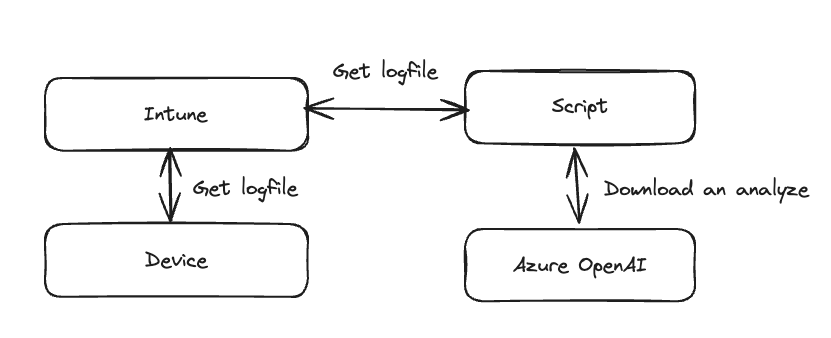
How does it work
GPT will use the content of the log and generate a summary but will also point you to potential errors on the device. This is a very simple approach but my goal is to show you how you can use AI in the device management to gain more insights and save time.
Preparation and prerequisites
You have to create an Azure OpenAi deployment. Once this is done you have to insert the azure_endpoint and the api_key in the script.
Simple Approach
Here you can find a simple script which works locally on a device.
import os
from openai import AzureOpenAI

file_path = os.path.join('C:\\', 'ProgramData', 'Microsoft', 'IntuneManagementExtension', 'Logs', 'IntuneManagementExtension.log')
with open(file_path, 'r') as file:
    log_content = file.read()

log_content = log_content[-128000:]

prompt = f"""
You are an senior intune engineer. Your task is to find errors in the [Intune Management Extension log]. Give the user a summary of the log an point him to potential errors on an structured way. Explain to the user what is mean and how he can check and troubleshoot this.

[Intune Management Extension log]
{log_content}
[END Intune Management Extension log]
"""

client = AzureOpenAI(
    azure_endpoint="https://YOUR_ENDPOINT.openai.azure.com/",
    api_key="YOUR_APIKEY",
    api_version="2024-02-01",
)

completion = client.chat.completions.create(
    model="gpt-4o",
    temperature=0,
    messages=[
        {
            "role": "user",
            "content": prompt,
        }
    ]
)

print(completion.choices[0].message.content)
Advanced Approach
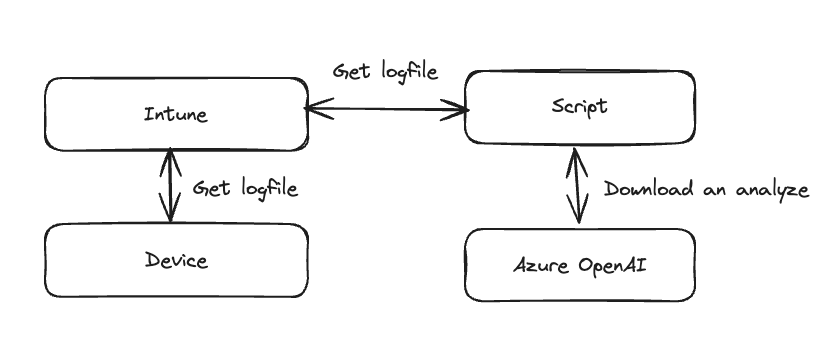
In this approach we will also enable the script to work remote. For this we need to upload the log file from the device and use this for the summary. It works like this:
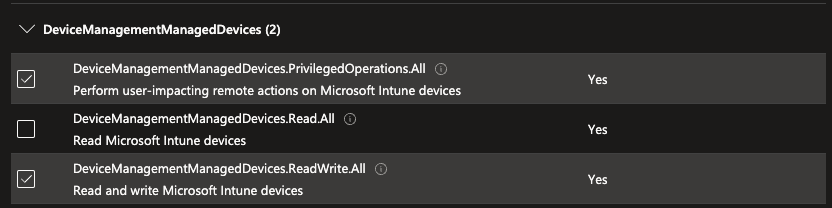
Bevor we run the script we have to fulfill and requirement. We need an app registration with the following permissions:
This is the full script:
"""This script is used to summarize the Intune Management Extension (IME) logs for a given device."""

import os
import urllib.request
import ssl
import zipfile
import requests
import msal

from openai import AzureOpenAI

from loguru import logger

CLIENT_ID = "CLIENT_ID"
TENANT_ID = "TENANT_ID"
CLIENT_SECRET = "CLIENT_SECRET"

OPEN_AI_API_KEY = "YOUR_API_KEY"
OPEN_AI_ENDPOINT = "https://YOUR_ENDPOINT.openai.azure.com/"

DEVICE_ID = "INTUNE_DEVICE_ID"


def get_access_token(client_id, client_secret, tenant_id):
    """Get an access token for the Microsoft Graph API using the"""
    authority = f"https://login.microsoftonline.com/{tenant_id}"
    app = msal.ConfidentialClientApplication(
        client_id,
        authority=authority,
        client_credential=client_secret,
    )
    result = app.acquire_token_for_client(
        scopes=["https://graph.microsoft.com/.default"]
    )
    if "access_token" in result:
        return result["access_token"]
    else:
        raise Exception("Could not obtain access token")  # pylint: disable=broad-exception-raised


def collect_logs(device_id, client_id, client_secret, tenant_id):
    """Load all apps from the Microsoft Graph API"""
    token = get_access_token(client_id, client_secret, tenant_id)
    headers = {"Authorization": f"Bearer {token}", "Content-Type": "application/json"}
    response = requests.post(
        f"https://graph.microsoft.com/beta/deviceManagement/managedDevices('{device_id}')/createDeviceLogCollectionRequest",
        json={"templateType": 0},
        headers=headers,
    )
    print(response.json())
    response.raise_for_status()
    return response.json()["value"]


def get_log_status(device_id, client_id, client_secret, tenant_id):
    """Load all apps from the Microsoft Graph API"""
    token = get_access_token(client_id, client_secret, tenant_id)
    headers = {
        "Authorization": f"Bearer {token}",
        "Content-Type": "application/json",
        "consistencylevel": "eventual",
    }
    response = requests.get(
        f"https://graph.microsoft.com/beta/deviceManagement/managedDevices('{device_id}')/logCollectionRequests?$select=id,status,managedDeviceId,errorCode,requestedDateTimeUTC,receivedDateTimeUTC,initiatedByUserPrincipalName&",
        headers=headers,
    )
    response.raise_for_status()
    logs = response.json()["value"]
    logs.sort(key=lambda x: x["requestedDateTimeUTC"])
    return logs[-1]


def download_logs(device_id, log_id, client_id, client_secret, tenant_id):
    """Load all apps from the Microsoft Graph API"""
    token = get_access_token(client_id, client_secret, tenant_id)
    headers = {
        "Authorization": f"Bearer {token}",
        "Content-Type": "application/json",
    }
    response = requests.post(
        f"https://graph.microsoft.com/beta/deviceManagement/managedDevices('{device_id}')/logCollectionRequests('{log_id}')/createDownloadUrl",
        headers=headers,
        json={},
    )
    response.raise_for_status()
    return response.json()["value"]


def summarize_logs(file_path):
    """Summarize the Intune Management Extension logs"""
    with open(file_path, "r") as file:
        log_content = file.read()

    log_content = log_content[-128000:]

    prompt = f"""
    You are an senior intune engineer. Your task is to find errors in the [Intune Management Extension log]. Give the user a summary of the log an point him to potential errors on an structured way. Explain to the user what is mean and how he can check and troubleshoot this.

    [Intune Management Extension log]
    {log_content}
    [END Intune Management Extension log]
    """

    client = AzureOpenAI(
        azure_endpoint=OPEN_AI_ENDPOINT,
        api_key=OPEN_AI_API_KEY,
        api_version="2024-02-01",
    )

    completion = client.chat.completions.create(
        model="gpt-4o",
        temperature=0,
        messages=[
            {
                "role": "user",
                "content": prompt,
            }
        ],
    )

    print(completion.choices[0].message.content)


def main():
    """Main function for the Streamlit app"""
    logger.info("Starting IME Summarizer")
    log_status = get_log_status(DEVICE_ID, CLIENT_ID, CLIENT_SECRET, TENANT_ID)
    logger.info(log_status)
    if log_status["status"] != "completed":
        logger.error("Log collection is not completed yet")
        return
    log_id = log_status["id"].replace(f"{DEVICE_ID}_", "")
    log_download_url = download_logs(
        DEVICE_ID, log_id, CLIENT_ID, CLIENT_SECRET, TENANT_ID
    ).replace('"', "")
    # Download zip
    logger.info(log_download_url)

    ssl._create_default_https_context = ssl._create_unverified_context
    urllib.request.urlretrieve(log_download_url, "logs.zip")
    # uzip logs.zip
    with zipfile.ZipFile("logs.zip", "r") as zip_ref:
        zip_ref.extractall("logs")

    # find folder
    log_folder = None
    for folder in os.listdir("logs"):
        if "ProgramData_Microsoft_IntuneManagementExtension_Logs" in folder:
            log_folder = folder
            break
    logger.info(log_folder)
    # Summarize logs
    summarize_logs(f"logs/{log_folder}/intunemanagementextension.log")

if __name__ == "__main__":
    main()
To initiate the log collection, you can run before:
def main():
    """Start log collection"""
    log = collect_logs(DEVICE_ID, CLIENT_ID, CLIENT_SECRET, TENANT_ID)
    logger.info(log)
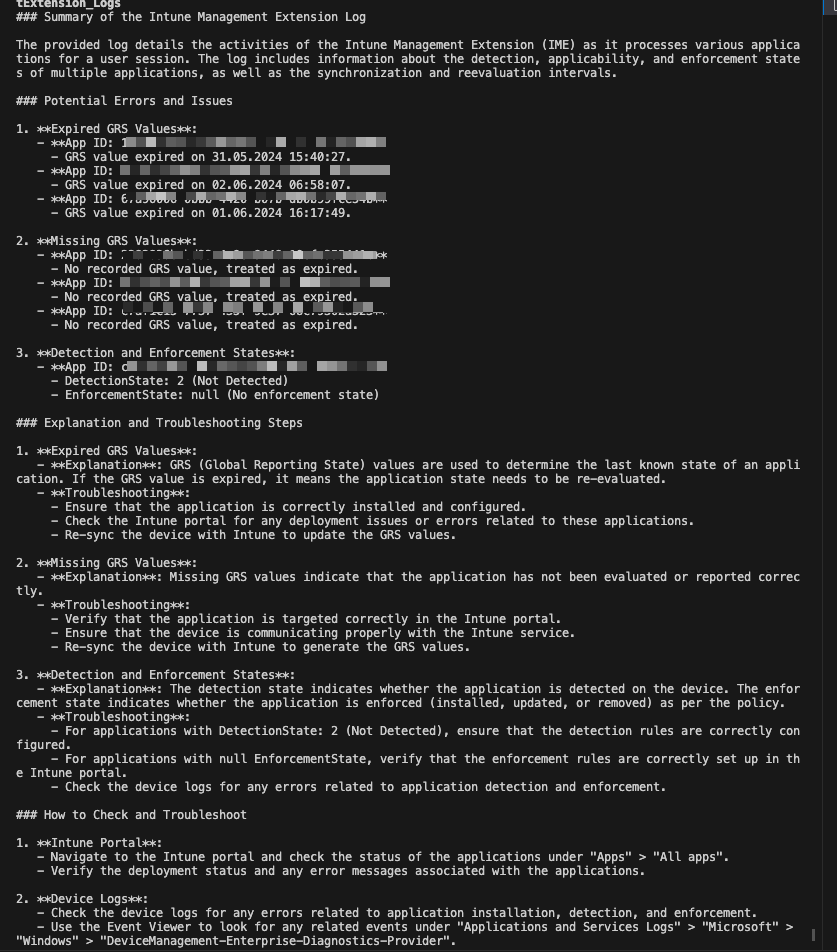
The output:
 jannikreinhard.com
This script is not working at all, the error msg is pasted below for you reference
At line:10 char:1
The ‘from’ keyword is not supported in this version of the language.
At line:12 char:1
The ‘from’ keyword is not supported in this version of the language.
At line:24 char:31
Missing argument in parameter list.
At line:28 char:18
Missing argument in parameter list.
At line:30 char:41
Missing expression after ‘,’ in pipeline element.
At line:35 char:7
Missing ‘(‘ after ‘if’ in if statement.
At line:35 char:23
Unexpected token ‘in’ in expression or statement.
At line:41 char:27
Missing argument in parameter list.
At line:43 char:39
Missing argument in parameter list.
At line:44 char:31
LikeLike
Did you run this in an python enviroment. Try to run python -m {script path}
LikeLike