
I wrote a lot of blogs about AI solution, utilizing e.g. Azure OpenAI. But I want to take you on this journey how you can build your own apps and websites. In this post I will show you how to build you customized solution with the help of two very powerful frameworks. One is Streamlit and one is Chainlit.
Both provide an interface for a Chat experience, but both has a different design (technical and visual).
What are the differences?
Streamlit is more optimized to build very easy webpages without taking care about HTML and other design languages. You can build the whole webpage with Python. Streamlit not only provides a chat experience it also provides an experience for building standard webpages. It interpretates the code always from top to bottom. This is something what you have to consider than you write the code. Always when an event is triggered like a button or text input the whole code is running.
Chainlit only provides a chat experience but in my point of view a more professional one. It also separates the front and backend. You can use Chainlit and build on top your custom frontend. The backend provides an easy integration with the most famous LLM (Large Language Model) frameworks.
How to start to build an app in Streamlit?
The first thing what you have to do is to take care that python and streamlit is installed on your device. Streamlit can easily installed via pip installed streamlit. When this is done you can launche the minimal app. To do this you can create a file you name app.py and then insert only need two lines of code:
import streamlit as st
st.title("Name of your app")
Now you can run the app with python -m streamlit run app.py
But our goal is to build a intelligent app. For this we need for sure also the OpenAi package and some more code. To install openai run pip install openai
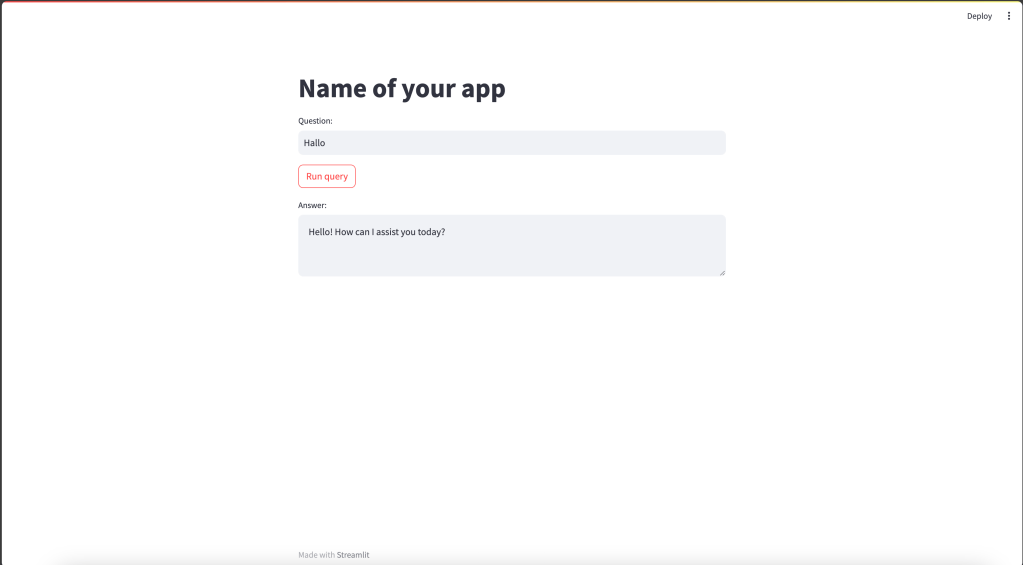
When you have this package installed it is also important that you have also access to an OpenAi instance. My recommendation is to choose an azure OpenAi. As mentioned above you can check out my previous post where I explain how you can deploy this service. If this is done and all the requirements are set, and you are good to go to implement an AI powered app. Here you can find some example code for a default web page:

import os
import streamlit as st
from openai import AzureOpenAI

st.title("Name of your app")

if "input" not in st.session_state:
    st.session_state.input = ''

deployment_name='REPLACE_WITH_YOUR_DEPLOYMENT_NAME'
client = AzureOpenAI(
    api_key=os.getenv("AZURE_OPENAI_API_KEY"),
    api_version="2024-02-01",
    azure_endpoint = os.getenv("AZURE_OPENAI_ENDPOINT")
    )

input = st.text_input('Question:', value=st.session_state.input, key='input')

if st.button('Run query'):
    response = client.chat.completions.create(model=deployment_name, messages=[
            {
                "content": "You are a helpful bot",
                "role": "system"
            },
            {
                "content": st.session_state.input,
                "role": "user"
            }
        ]
, max_tokens=1000)
    st.text_area(label="Answer:", value=response.choices[0].message.content)
You can also check out my Repostitory where I wrote a remediation creation App: JayRHa/Remediation-Creator (github.com)
To build a chat experience you can use the following code:

import streamlit as st
prompt = st.chat_input("Say something")
if prompt:
    st.write(f"User has sent the following prompt: {prompt}")
Also, here you can integrate the OpenAi module to forward the prompt to the service.
How to start an app in Chainlit?
The procedure is very similar to Streamlit. You need also python and the chainlit package. You can install this via pip install chainlit. A minimal app in chainlit looks like this:
import chainlit as cl
@cl.on_message
async def main(message: cl.Message):
    await cl.Message(content="This is a test message answer").send()
Also, here we want to have more intelligence. Let us build here also a chatbot which forwards your chat to the Azure OpenAi to genrates answers for your questions. Here Chainlit also has an inbuild OpenAi handler with cl.instrument_openai.
import os
from openai import AsyncAzureOpenAI
import chainlit as cl

client = AsyncAzureOpenAI(
    api_key=os.getenv("AZURE_OPENAI_API_KEY"),
    api_version="2024-02-01",
    azure_endpoint = os.getenv("AZURE_OPENAI_ENDPOINT")
    )

cl.instrument_openai()
settings = {
    "model": "gpt-3.5-turbo",
    "temperature": 0,
    # ... more settings
}

@cl.on_message
async def on_message(message: cl.Message):
    response = await client.chat.completions.create(
        messages=[
            {
                "content": "You are a helpful bot, you always reply in Spanish",
                "role": "system"
            },
            {
                "content": input,
                "role": "user"
            }
        ],
        **settings
    )
    await cl.Message(content=response.choices[0].message.content).send()
 jannikreinhard.com