

Right Click Tools built its reputation on making endpoint management within Microsoft Configuration Manager (ConfigMgr) simpler and faster. After the success of the free ConfigMgr add-on, Recast Software has now brought the same capabilities to Microsoft Intune with the new Right Click Tools for Intune Community Edition browser extension.
Bridging the Gap Between ConfigMgr and Intune
Many IT teams manage on-premises devices, co-managed setups, and Intune-only environments. Previously, the free Right Click Tools Community Edition was limited to ConfigMgr. Now, with the new extension available for both Chrome and Edge browsers, teams managing co-managed devices can access key right-click actions directly in the Intune console. This means no more switching back and forth between consoles.
What’s Included
The Community Edition for Intune offers the familiar features IT teams have come to rely on, now built into a browser extension:
- Core Device Actions: Quickly trigger essential client actions with a right-click.
- Productivity Tools: Scan for devices in ConfigMgr and Active Directory, and act on the results.
- Compliance Checks: Run focused software update deployment scans and remediate issues.
How It Works
Getting started is easy:
- Install the Browser Extension: Download and install the free Right Click Tools extension from the Microsoft Edge or Google Chrome Add-ons store.
- New (Free) License Required: All users—including existing ConfigMgr Community Edition users—will need a new license that works for both ConfigMgr and Intune.
- Seamless Integration: Once installed, right-click actions appear in the Intune console for co-managed devices. You’ll see the core actions you need for daily tasks and security checks.
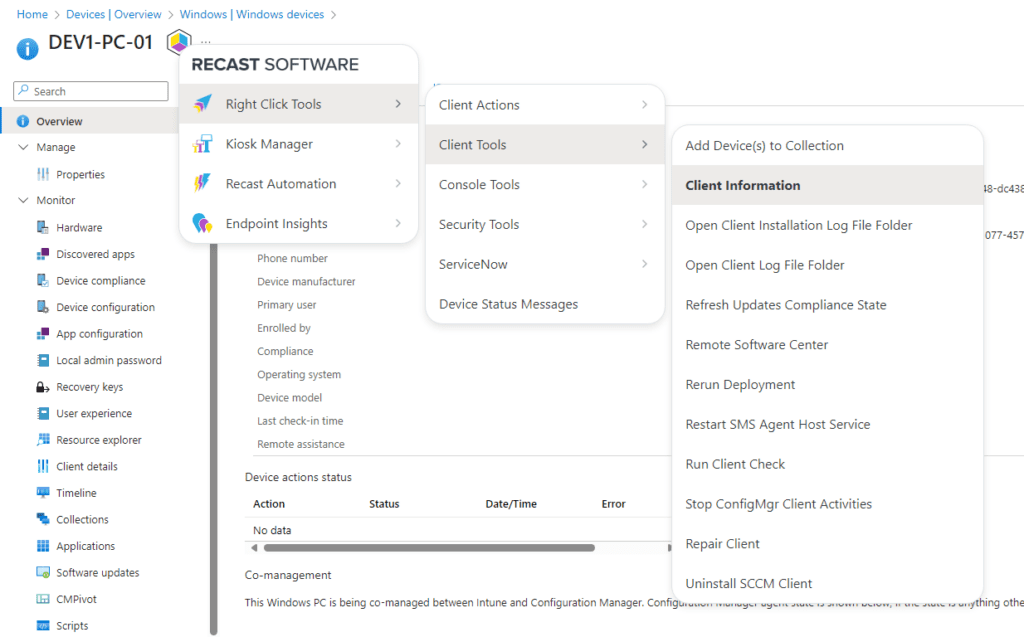
This simple setup lets you streamline your workflow by bringing proven device management tools directly into the Intune environment.
The Value of a Unified Management Experience
By integrating Right Click Tools into Intune, you reduce the time spent switching between different consoles. With direct access to critical device actions, you can:
- Speed Up Routine Maintenance: Trigger system information checks, remote Windows security actions, or review BitLocker status with just a few clicks.
- Enhance Security: Quickly run compliance checks and security scans to keep your endpoints secure.
The free Community Edition provides the tools needed for co-managed scenarios, saving both time and effort.
Conclusion
Right Click Tools Community Edition for Intune builds on a legacy of trusted tools, now extending its benefits to a broader range of endpoint management scenarios. By bringing essential actions directly into the Intune console, it reduces the need for constant context switching and helps maintain tighter security and compliance standards. Ready to boost your productivity and simplify your IT operations? Download the free browser extension and experience a more unified management approach. For those who need even more, explore the added capabilities of Right Click Tools Enterprise Edition
 jannikreinhard.com