

Some month ago I relesed an script which lists you all assignments of an aad group in intune. With this blog post I will release a new version of this script which includes more configuration objects and improves a lot of the code parts.

What is the purpose of the script
It is not possible via the UI or via an single graph call to get an list of all assignments of an specific aad group. For example if you are wondering if a group is still in use of if you want to troubleshoot a specific assignment. This script helps you to find exacly this out to get all configuration object of an single group.
Which objects are included
The script currently supports:
- Device Configuration
- Administrative Templates
- Device Compliance Policies
- Mobile Applications
- Scripts
- Remediation Script
- Windows Autopilot deployment profiles
- Enrollment Status Page
- Security baselines
How to get the script
You can find the script in my github repository or in the powershell gallery:
Install-Script -Name Get-AllAadGroupAssignments
Get-AllAadGroupAssignments
How can I add new topics to the script
It is really easy. You only have to add this code block to end of the script:
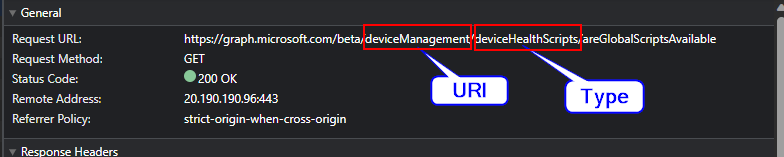
Get-Topic -topicHeadline "Remediation Scripts" -groupId $group.id -uri "deviceManagement" -type "deviceHealthScripts" -uriAssignment "assignments"
Add the name of the topic to and set the graph uri and the type. You can find this via the graph explorer:
 jannikreinhard.com
Thanks for your work 🙂
I don’t know if it’s already done, but it can be good also to can filter with one specific user or one specific device to see all deployment they get for troubleshooting purpose. Thanks for your work
LikeLike
[…] New Version of the intune group assignment script […]
LikeLike
Hi, do we have a script to include filters in assignments?
LikeLike