
As an administrator, it is always good to keep an eye on your Intune status. In this blog I would like to show you how you can display the current status with the help of a small PowerShell script.


As an administrator, it is always good to keep an eye on your Intune status. In this blog I would like to show you how you can display the current status with the help of a small PowerShell script.

The taskbar became fuller with Windows 11. In a previous blog I explained how to remove the teams icon or delete it completely. In this blog I want to explain how to hide the task view, widgets and search with the help of a remediation script.
Bevor:

After:


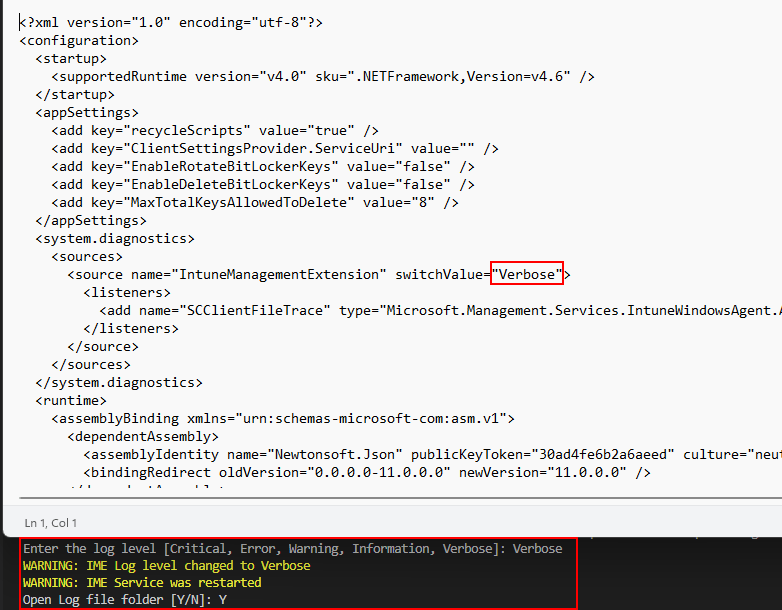
For troubleshooting purposes it is helpful to change the log level of the Intune Management Extension. Since this has to be done in an XML config file of the IME and this can affect the function of the IME when inserting a wrong value. I wrote a script which make the change of the log level easy.
It is difficult for support engineers to guide users to the company portal because the company portal is called differently depending on the system language. In german, for example, the Company Portal is called “Unternehmensportal”. To simplify this and make access faster I have written a small system tray icon. This icon is not only there to open the Company Portal, it also offers many other functions to simplify the troubleshooting process.


You may have noticed that, an autopilot hash looks a little different every time you create it. In this blog I want to show you how to encode an autopilot hash and display the content of it.
Read More »
Microsoft has described in a blog post (Adding a Certificate to Trusted Publishers using Intune) how to create a custom config profile to get a certificate into the trusted publisher store. Since there are several manual steps to read the thumbprint from the certificate and encode it to a base64 string I wrote a script that does all this for you and automatically creates a new configuration policy.
Read More »
Who does not know the situation when you come back from vacation and the computer wants to reboot after an update installation. However, it is extremely important from a security point of view that the system is always up to date. How about a solution that updates are always installed directly, but gives the user a little more time to read emails and reboot the device only when it fits for him. Another example is when a measurement or other process is running on the computer for several hours or days. Also here it would be really bad if a reboot interrupts this measurement. In this blog I show how you can delay the reboot after an update installation but still remind the user of the reboot and give him the chance to do it when it suits him.

Hello everyone, after several months of inactivity I would like to post regularly new content here on my blog. I start here with a topic which I have already blogged last year. This post is about how to restrict who can log on to on windows via Intune. Intune has a cool new feature that allows you to manage the members of local groups. In my previous blog I did this restriction with a configuration profile and put a AAD user into the local group via a custom profile and an OMA-URI. Now Microsoft has added a new CSP that allows you to do this in an much more elegant way. How to use this I explain now in this blog post.
Read More »
A build in teams client is shipped with Windows 11. This client can only be used with a personal Microsoft account. This client is usually not welcome in corporate environments. How to remove this build-in client with the help of Intune I will show you in this blog post.
Read More »
With Windows 11, microsoft take the decision that a TPM 2.0 (Trusted Platform Module) is mandatory to run windows 11. Due to this prerequisite, Windows 11 cannot be installed or upgraded on many computers. In this blog, we’ll look at what a TPM is, how to check if you have a TPM 2.0, and how to install Windows anyway.
Read More » jannikreinhard.com