Intune Tool Box – Rebuild of Intune in PowerShell

I think everyone who works with Intune on a daily basis knows the situation that they would like to have a simple feature that would simplify their daily work. In order to close exactly this gaps I decide to code my own tool with many small features that would make the life for Intune admins easier. This was the birth of the Intune Tool Box. This tool is a WPF application that is written in PowerShell. The app has the same design as Intune but offers small helpers for the daily work. The good thing is that this app is built in such a way that it can be easily extended at any time. If you have any features in your mind that you are missing in Intune console but is possible to solve this via graph so let me know that I can add this to the app. My plan is to develop the app step by step and bring in new cool features.

Read More »

Applicability Rule: Gone but still there

With the introduction of Assignments filter, the value of Applicability rules has diminished. With Applicability rules you could define on which OS versions a Configuration Profile should work. Unfortunately, the ability to configure or delete applicability rules for some configuration profile types from the console has also been removed. It is to be expected that this can happen piece by piece also for further types. In this blog I want to show you how you can easily remove all applicability rules to switch to filters as soon as possible.

Read More »

Migrate an AAD User group to a Device group and vice versa

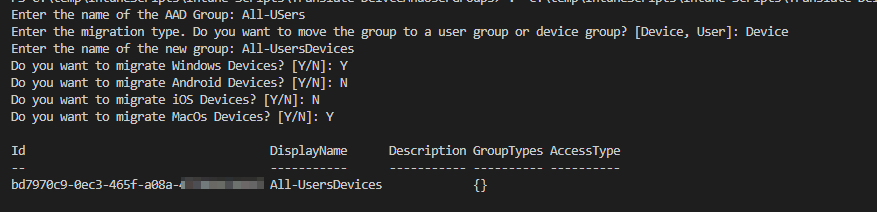
In your environment you have multiple groups to create assignments of an app or a configuration profile. If you later realize it would be better if this was not a device group but a user group, it is hard to change this without the user having an impact or you have big efforts. I have written a script that you can convert a user group into a device group or a device group into a user group based on the user assigned to a device or based on the devices assigned to the user.

Read More »

Copy Intune Discovered Apps in Log Analytics Workspace

Intune offers the possibility to show per device not only the apps installed via Intune but also the apps discovered on the device (Control Panel apps). Since this view is relatively static and you only have a per device view here, it is difficult to make analyses of the complete environment, e.g. to see which app is missing in the portfolio, since this is often installed by users themselves. Why don’t we use log analytics to have more options to work with this information’s? In this blog I want to show you how you can do this easily with a script.

Read More »

Configuration of Windows Update reboot notifications

In one of my blog posts (Delay Windows Update pending reboot with toast notification) I have already described how to give the user more flexibility in deciding when he wants to reboot his device but still remind him regularly. In this blog I want to explain you how to configure the system notification of Windows Update for business. The reason for this blog is a question in the Microsoft tech community.

Read More »

Getting Started with Mac Management in Microsoft Intune

I have already described in one of my first blogs how you can set up an Endpoint Manager development environment and enroll Windows devices via Autopilot and manage them. Apart from Windows, you can also manage iOS, Android and MacOS very well with Intune. Apple offers a good interface (MDM Protocol) to manage MacOS devices, unfortunately not all options are supported with Intune. Also in the WWDC22 there was some great new features introduces.

MacOS support was added to Intune back in 2015. At that time, the management of Mac devices was still very limited – something that has changed in the meantime. The number of companies using Mac devices is growing more and more, as is the general market share of macOS compared to Windows. This was around 3% in 2009 and has risen to 15% today (2022). Of course, Windows is still in front, but a trend can be seen.

There is a lot of worthy blog that deals with the topic MacOS management and Intune:

Just to name a few. Of course there are some great other blogs.

In this blog I want to give you a step by step guide on how to enroll a macOS device in Intune. There will be more blogs in the future with the topic of managing macOS with Intune.

Read More »

How to update Quick assist with Intune

Quick assist was a cool windows out of the box tool that can get or provide PC support via a remote connection. Because Quick Assist is a pre-installed app in Windows, it can also be used to provide support during setup via e.g. Autopilot. The experience for the user was really easy. You have to only read out a 6 character code from the client and type in on the quick assist app on the supporter site.

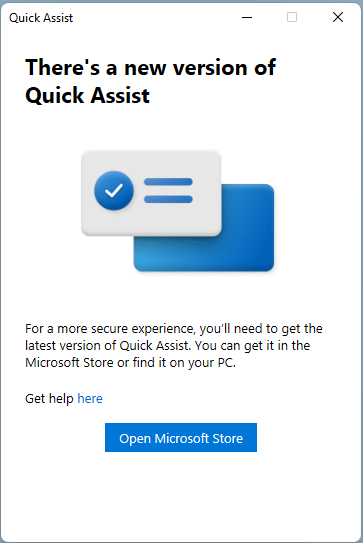
But this will be changed quick assist will not be longer a build-in tool in windows. Microsoft posted on April 27, 2022 in the Windows Insider blog that Quick assist will only be available via the Windows Store in the future and that support for the old client will end. So, if you want to continue using Quick assist in the future, you will have to install it from the Windows Store.

However, there are several problems here. The first problem is that the installation of Quick assist from the Windows Store requires admin rights. This is not always the case in a professionally managed business environment where users also have admin rights on their PC. The second problem is that if you are using Windows LTSC there is no Windows Store to get quick assist from. And user getting a error messages about missing WebView2 runtimes.

How you can solve this problem I will show you today in this blog.

Read More »

Use Endpoint Analytics to find slow internet breakouts

Users always complain that the network is slow. This can also be measured centrally using various network monitoring tools. However, this monitoring can only provide complete insight if the user is actually onsite in the corporate network. If the user is sitting in the home office and is connected to the internet via his own router, this is not always so easy. But there are also many other reasons why a user has a slow connection. It is not always due to the network. In this block I want to show you how you can test the speed of all clients regularly with a simple remediation script and upload it to a log analytics workspace to do some analysis.

Read More »