
During the recent MMS conference, I had the opportunity to get an early look at the new Patch My PC Home Updater 5.0. Keeping your PC updated is crucial for security, performance, and accessing the latest features in your applications. In business environments, IT teams usually handle this task, but in our personal lives, it’s an important responsibility that often falls to us individually.
To simplify this process, Patch My PC offers a free tool designed to keep your home PC’s software up to date effortlessly. In this blog, I’ll walk you through how it works and what’s new in version 5.0.
What’s New in Patch My PC Home Updater 5.0?
A Modern Interface with Dark Mode
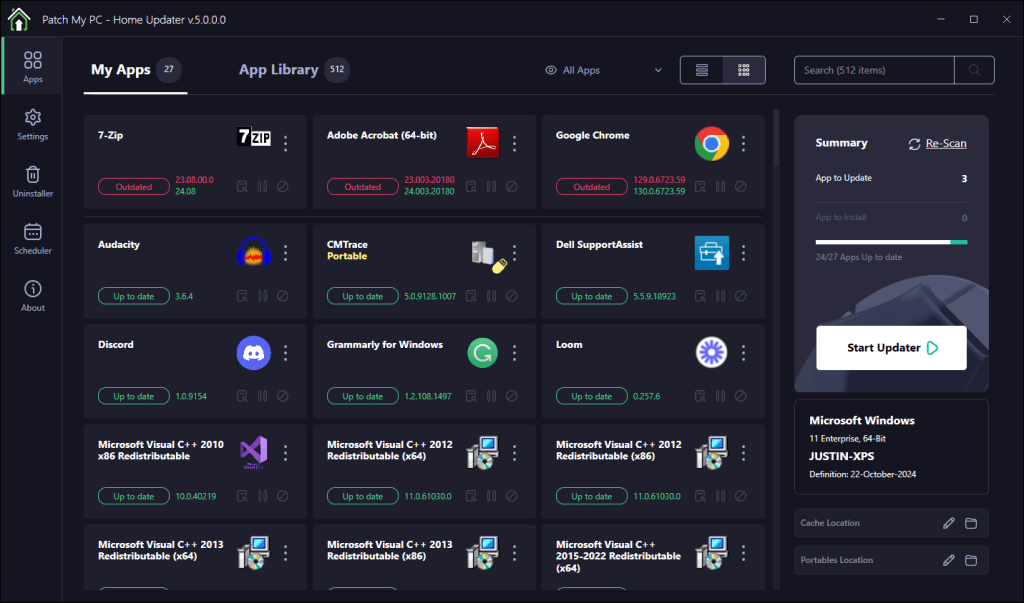
One of the first things I noticed was the completely revamped user interface. It’s clean, intuitive, and now includes a dark mode option.
Rebuilt from the Ground Up
Version 5.0 isn’t just a visual overhaul; the application has been re-architected from scratch. This redesign aims to improve performance and reliability. During my testing, scans for outdated software were faster, and updates ran smoothly without any hiccups.
Expanded Software Library: Over 500 Supported Apps
The update has significantly expanded its library, increasing from around 300 to over 500 supported applications. The chance that your applications are part of it is high.
Enhanced Search and App Detection
The dynamic search feature has been enhanced, making it easier to find specific applications. Improved detection algorithms ensure that all your installed software is accurately identified.
Grid View and Pending Installs
Managing multiple applications is now more straightforward thanks to the new grid view and the ability to see pending installs. This feature provides a clear overview of your software status and lets you manage updates more effectively.
Redesigned “My Apps” Tab
The “My Apps” tab has been overhauled to give users better control over installed applications. From here, you can easily update, uninstall, or disable auto-updates for specific apps.
Transition to MSI-Based Installer
Previously, Patch My PC Home Updater was available as a portable executable. With version 5.0, they’ve moved to an MSI-based installer. While some users prefer portable apps for their simplicity, the MSI installer provides better integration with Windows and allows for features like automatic updates and scheduled tasks.
What Are the System Requirements?
- Windows 10 or later (64-bit)
- Microsoft .NET Framework 8
- Internet access
How Does It Work?
Installation: After downloading the MSI installer, the setup process is straightforward. Once installed, the application automatically scans your system for installed software.
Updating Apps: The main interface lists all your installed applications, highlighting those that have available updates. You can choose to update all at once or select specific apps to update.
Installing New Apps: Besides updating existing software, you can also install new applications directly from the app’s library. Simply check the boxes next to the programs you want, and Patch My PC will handle the rest.
Scheduling Updates: One of the standout features is the ability to schedule automatic updates. You can set it to check for updates at specific times and frequencies, meaning you can keep your software up to date without manual intervention.

Security and Reliability
All updates are thoroughly tested for proper detection and installation. Additionally, they are scanned using VirusTotal to ensure they are free from malware. This provides an extra layer of confidence when updating multiple applications from a single tool.
Final Thoughts
Keeping your software updated is a crucial but often overlooked aspect of personal computer maintenance. Outdated applications can pose security risks and may not perform as well as their updated counterparts. Tools like Patch My PC Home Updater 5.0 make it significantly easier to manage this task.
Download it from here: https://patchmypc.com/home-updater#scheduler
 jannikreinhard.com