
You plan to migrate to Intune? Then do this Cloud Native! Use the chance and get rid of you on-premises environment, maintenance of the infrastructure and move this responsibility to Microsoft. In this blog I want to explain what cloud native is and what Intune provides you to make your journey to a success.

What is cloud native endpoint management?
Cloud native endpoint management refers to the approach of managing all your company devices such as laptops, tablets, and smartphones entirely through cloud-based solutions, rather than relying on traditional on-premises infrastructure. This method leverages the full potential of the cloud services like azure and Intune. It provides you with agility, scalability, and resilience of the cloud to manage your endpoints.
In a cloud native setup, the management operations, policies, scripts, and configurations are delivered over the internet, allowing IT administrators to manage and secure corporate resources remotely independed from the company network. This approach supports a wide range of devices across different operating systems and geographic locations, enabling more flexible, agile, and comprehensive endpoint management.
Key benefits of cloud native endpoint management include:
- Scalability: Easily scales up or down to handle an increase or decrease in the number of devices without the need for physical infrastructure adjustments.
- Flexibility: You can manage devices from anywhere, at any time, as long as they have internet access. This opens doors for remote work and BYOD (Bring Your Own Device) use cases.
- Cost Efficiency: Reduces the need for costly hardware and dedicated IT resources for maintenance and remote network solutions. New versions and features will be rollout out without an interaction. This lowers your overall IT costs.
- Security: Enhances security by consistently applying updates, policies, and patches across all devices, ensuring compliance, and reducing vulnerabilities.
- Resilience: Offers high availability and disaster recovery capabilities out of the box. This minimizing your downtimes and data losses.
What does Intune offer?
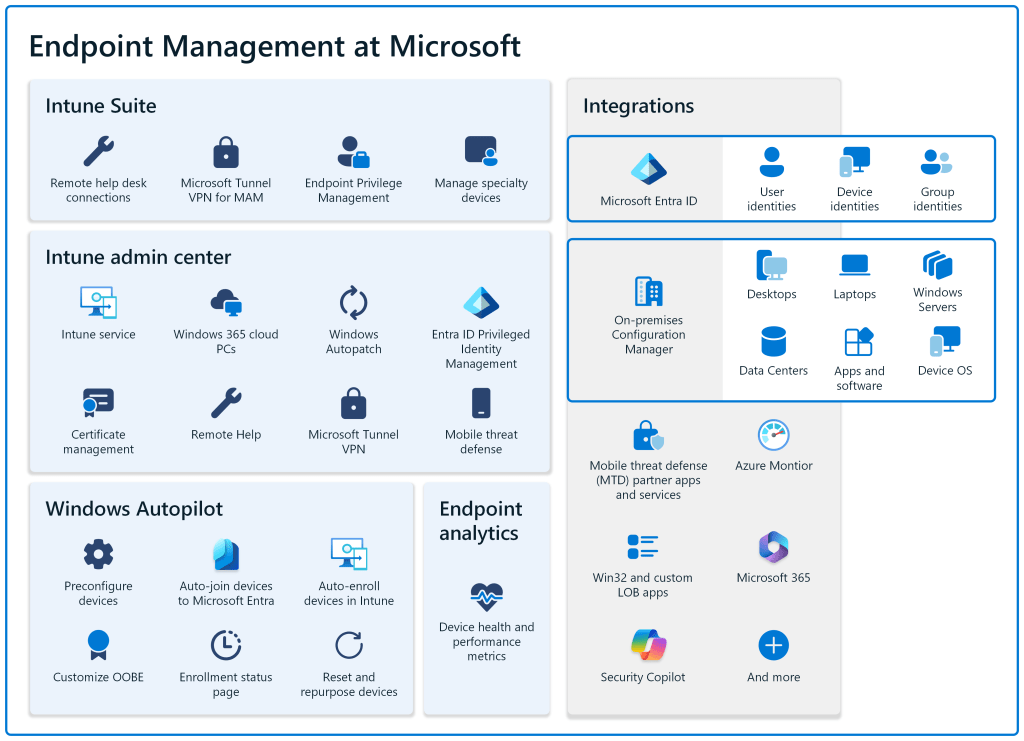
What does Intune offer to make your journey to a cloud native endpoint management to a success. My answer is a lot. In the core of Intune, you can find everything what is needed to manage your devices secure and efficiently like policies, app distribution, reporting, and much more. But beside the core features you can also find the Intune suite which consolidate all the additional needs around the device management in one license (also single service licenses are available). The Intune Suite provides you capabilities for remote support, cloud PKI, In-app VPN, Enterprise privilege management and much more.
The combination of Intune Core + Intune Suite should fill the most of your requirements for a good device management. But you also have Azure beside Intune which will help you out with hundreds of different services to build e.g. custom solutions for reporting and automation.
Zero trust is key!
In the evolving landscape of cybersecurity, traditional perimeter-based security models are no longer sufficient due to the increasing risk of cyber threats and the expanding nature of corporate networks. For me a company network is more or less the same as the public internet.
The Zero Trust model changes the way how organizations secure their IT environments. This model operates under the principle of “never trust, always verify,” which ensures that security does not rely on the boundaries of the physical or network perimeter.
Principles of Zero Trust
Zero Trust security involves several key principles:
- Verify Explicitly: Every access request, regardless of where it comes from, must be fully authenticated, authorized, and encrypted before granting access.
- Use Least Privilege Access: Users are granted access only to the resources they need to perform their duties, and nothing more. This minimizes the potential impact of a breach.
- Assume Breach: This principle operates under the assumption that attackers could be both within and outside of the network. This means continuous monitoring and validation of all network and device activity.
Intune e.g. provides the capabilities with the compliance policies to check the devices if they are fulfilling all the requirements the company has. This can be predefined policies or also custom compliance scripts which runs on a device and based on the return the policy check will be marked as compliant or not. These states can then be uses as one factor in Conditional Access Policies.These are granular access controls based on user identity, device compliance, location, and risk level. This ensures that only trusted devices and users can access sensitive resources.
If there is really on connection to the on prem network is needed for a single app you can also have a look at the Global Secure Access Gateway in Entra ID. This full 100% the zero trust principles and support the on-premise access also in a cloud native world.

Advantages of an cloud native deployment
- Best for remote workers
- Deploy from anywhere
- Simplified management for all platforms
- Provide a secure Single-Sign-On (SSO) experience
- Secure access without passwords
- Seamless experience for documents, settings, and preferences
Key principles
- Try to have as less as possible on prem dependencies.
- Question everything if this is really needed
- Don’t see blocker see chances.
- Intune is not SCCM in the cloud. This means things works different. Don’t blame on features which are missing.
- See it as chance to cleanup old things and think them new and modern.
- Be creative there are always solutions.
- As mentioned above with Intune and Azure you have an very loaded tool box with unlimited possibilities to create solutions.
How to plan you cloud native deployment
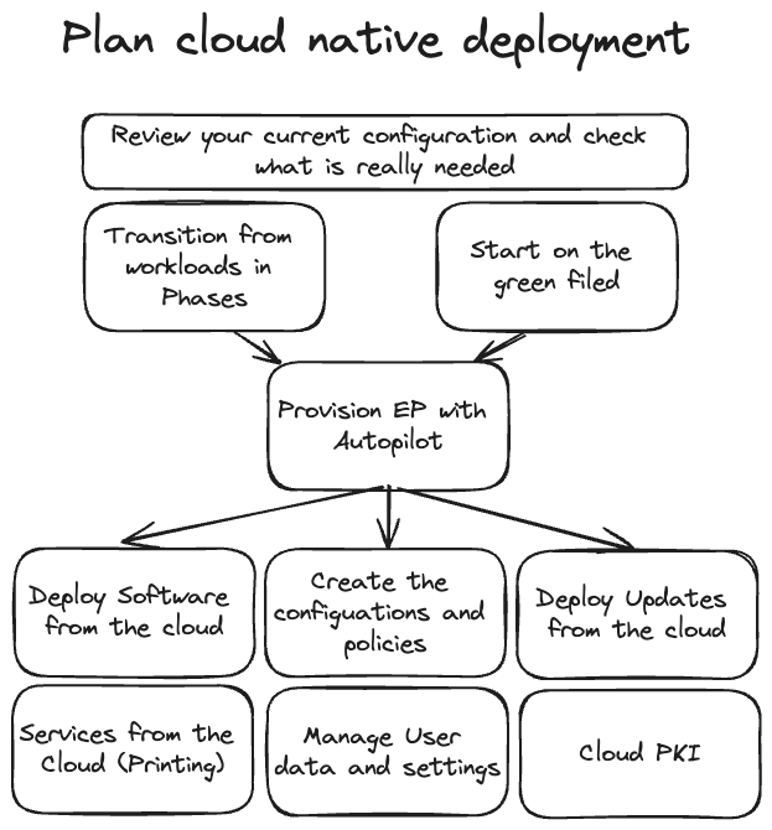
There are two ways I see. My recommended way is to start on the greenfield and setup an clean and fresh cloud only environment. Enroll all new devices Intune intune and keep the old ones in SCCM until all devices are replaced. The other way is to go co management and shift workload for workload. This is the second way which may brings additional complexity and cons. Once this decision is taken start to make an clear plan how your solution design is. This design should include things like naming convention, security and hardening concept but also things which additional cloud infrastructure and resources are needed to run your apps and services but much more.
How to start and how to plan your project
Start with a Solution Designe where you write down how your endpoint should look like form an architecture point of view. You should have concepts for the naming of objects, design principles for your scripts, a security concept and everything else what is important.
One this is done you can setup an POC (Proof of concept) to check how this works in your enviroment with your requirements. This has not to be the 100% implementation it should only be an minimal setup for testing and getting a feeling. Once this is done you can continue with the configuration and the preparation of a pre-pilot with a very small group of IT affine persons to get feedback.
Once this is done than you should start with a key component of the whole and this is changing management. You need change management to the end-users but also for the IT guys to enable your colleges also from other areas like network, security,
When you have than a setup which is more final you can start with a security review like a penetration testing to make sure that the design you took is as secure as possible. After this you should start with a bigger Pilot to get more feedback and to fix the remaining stuff and polish your setup. In parallel you should make everything read for the go live (go live preparation).
The last step is then the real go live and for sure a static task is the continues improvement.
 jannikreinhard.com
[…] Cloud native Endpoint deployment […]
LikeLike