
Foundry Browser Automation GA: Approvals, Identity and Proof
Build a controlled Foundry browser-agent pilot with Playwright workspaces, separate website identity, human takeover and read-after-write checks.
For my first Browser Automation pilot in Foundry, I’d pick a job the helpdesk already understands: change the category of one ticket. On the test record, I know the ID, the old value and exactly where I can check the change afterwards.
I’ll walk through the Playwright connection first, then use a fictitious ticket to show what to approve and what to read back. I opened the connection form in Modern Device Management without creating a workspace or running a browser session. The GA announcement explains the new supervision controls; the ticket exercise below is mine.
Pick a task with an observable end state
My first candidate would be a small internal application without a suitable API: find a synthetic service ticket and prepare a category change. The agent may inspect the record and propose the new category. A person approves the write.
Use a disposable record with a unique identifier, for example DEMO-1842. Give the test a precise expected result:
{
  "record": "DEMO-1842",
  "before": { "category": "Unclassified", "version": 7 },
  "requested": { "category": "Device access" },
  "write_requires_approval": true,
  "success_requires": ["correct_record", "persisted_category", "single_change"]
}
This is my test contract, not a Foundry configuration schema. Its purpose is to make a fluent explanation insufficient for a pass.
Prefer an API or supported connector when one already exposes the operation reliably. A browser is valuable for the remaining interface, not a reason to replace a stable integration with coordinates and page text.
Connect a browser service, not a website account
In the new Foundry experience, open the project’s tools and choose Browser Automation. The setup asks for a Playwright workspace. The current tool uses the workspace’s remote MCP capability; region support must be checked for the chosen project and workspace. Browser tool setup
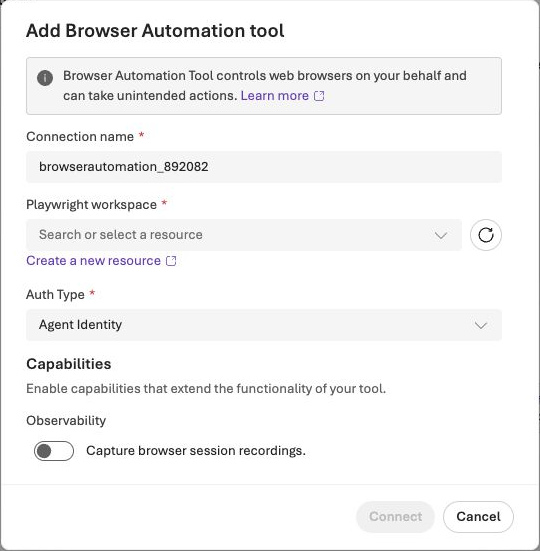
Modern Device Management, 2 November 2026. This unsaved connection form shows Agent Identity and the workspace selector. Connect remains disabled; no browser infrastructure was created.
Keep three identities in the design notes: the developer configuring the connection, the agent accessing the browser service, and the account authenticated inside the destination website. Granting the agent access to a Playwright workspace does not log it into the ticket application. Remote MCP authentication
For the pilot, use a dedicated application account restricted to the synthetic records. Do not reuse a global administrator’s interactive session because it makes sign-in convenient. Decide who may view a live session and recordings before putting customer information on screen.
Separate observation, approval and verification
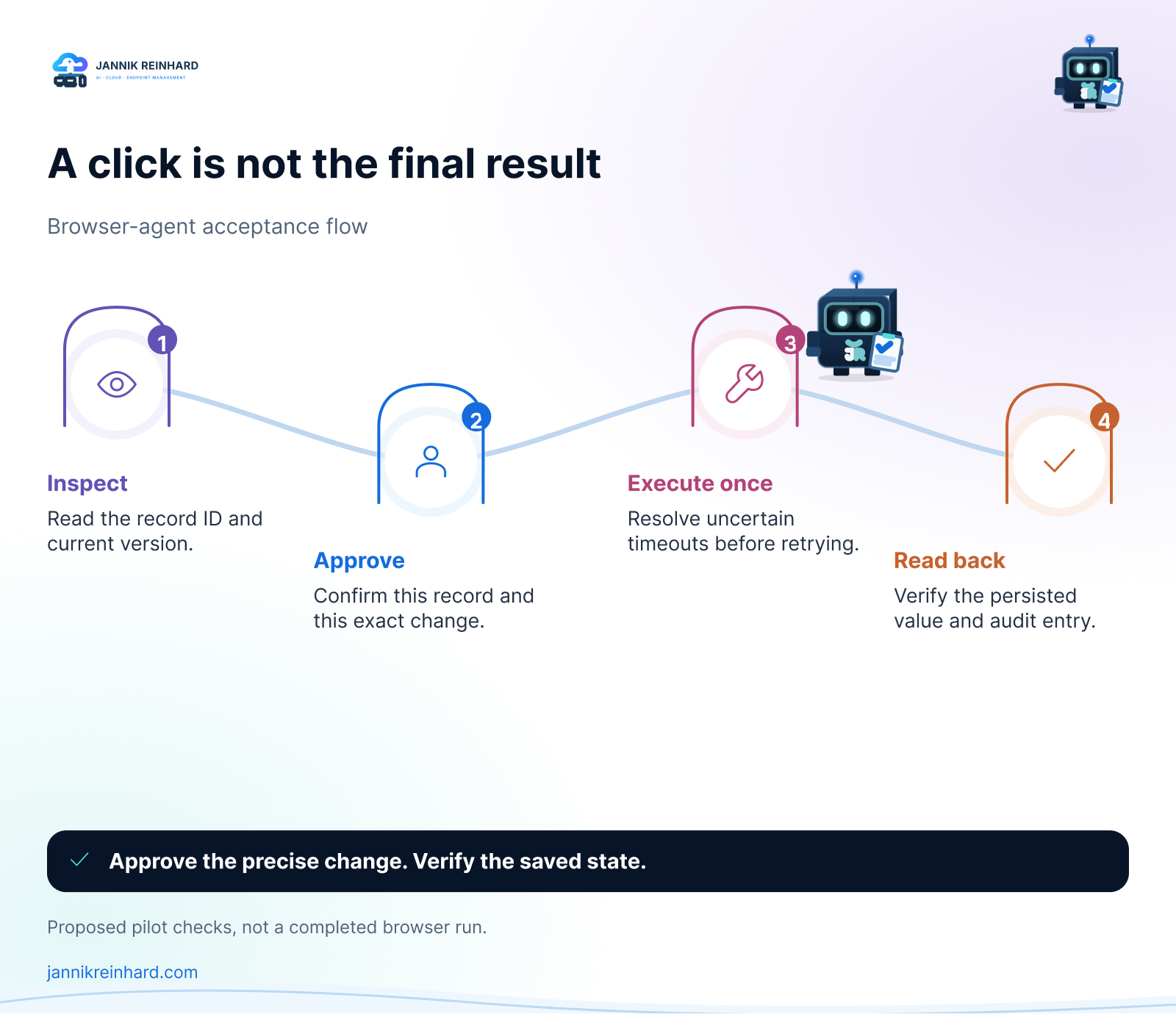
Proposed acceptance flow. Approval and final-state verification are separate decisions.
The GA release includes live viewing, human takeover and controls over tools and approvals. These features make supervision possible; they do not define your business approval policy for you. Supervision capabilities
An approval should name the record and the change, not just ask whether the agent may continue. For the example, I want: “Change DEMO-1842 from Unclassified to Device access.” If the record changes while approval is pending, re-read it and request a new decision rather than applying an outdated proposal.
Enforce the boundary in the tool or application layer where possible. Instructions such as “always ask first” are useful procedure, but a prompt alone should not be the only thing stopping an irreversible click. Test the exact write-capable tools available to the agent, including separately connected MCP tools.
The five gates I use for production MCP tools provide a separate review for authentication, authorization and downstream effects.
Human takeover also needs a hand-back rule. If I edit the page during an intervention, the agent should inspect the current record again. It must not resume a click sequence based on the screen that existed before I took control.
If your application exposes a record version, bind it to the approved write. In a browser-only workflow the application may not offer an atomic compare-and-set. A read immediately before Save reduces the window but doesn’t close it. For a workflow where someone else can edit the same record concurrently, I’d keep the write manual or move it behind an API that can enforce the version.
Read the application after the click
For a write, save the record identifier, proposed old and new values, approval decision and execution attempt. Then verify persisted state through an independent application read: a fresh record view, an audit record or a supported read API.
A toast that says Saved is useful evidence of an application response. It is weaker than reading the resulting category and checking the record identifier again. A screenshot of the form before saving proves neither.
I would make an uncertain timeout a first-class result. If the save request may already have reached the application, do not retry blindly. Re-open the record, inspect its current version and decide whether another write is needed. Use the application’s idempotency support when available; an agent-generated request label does not automatically provide it.
Put failures into the first test run
I would run three failures before the happy path. First, put a second ticket with a similar subject on the screen; approve only the first ID and check that the second stays unchanged. Next, refuse an approval and verify in the application’s audit log that no write occurred. Finally, interrupt the connection after Save and check whether recovery starts with a read. If the agent presses Save again before checking, the test failed even when the final category looks right.
Repeat with an expired session, a page that contains instructions for the agent, and an intervening edit during takeover. Record the expected stop for each case. The old approval doesn’t cover a changed record, and the content of a ticket can’t authorize an export.
Run these against the saved agent version and the intended application role. A successful test with a more privileged account does not validate the restricted account’s workflow.
Keep recordings useful and proportionate
Recordings and traces can help explain a failure, but a browser can display personal information, tokens or confidential documents. Define who can read diagnostic content and how long it remains available. Foundry documents separate controls for sensitive trace content. Trace-content access
For this pilot I would retain the minimal record fields and correlation IDs needed to reproduce a problem. Avoid exporting complete customer pages into a generic debug log. Also measure browser-session time, retries and human intervention: a low model-token bill can hide an expensive manual recovery process.
My release criterion would be a small table of task outcomes: approved and verified, refused without a write, or stopped with an explicit reason. Start with one narrow workflow and keep the application-side evidence. That is enough to decide whether browser automation is genuinely helping before giving it a wider job.