
Graph Batch Endpoint
Combine up to 20 Microsoft Graph requests into a JSON batch. Review the Python example, individual responses and error handling for each request.
This is only a small blog post but maybe for most of you very helpful, especially if you work a lot with Microsoft Graph. Often the problem is you want to run multiple calls and then you have to loop through the single items or have a long line of calls. The Microsoft Graph Batch Endpoint solves exactly this by letting you combine many requests into one single HTTP call.
While writing another blog post, I found out that there is a batch endpoint for MS Graph. In this blog, I will show you how you can use the Graph Batch Endpoint and give you also an example script that you can adapt for your own automations.

Why the Graph Batch Endpoint matters
If you have ever built a script that fires off dozens of individual Microsoft Graph requests, you already know the pain: each call adds network latency, and you can quickly run into throttling. The Graph Batch Endpoint lets you send up to 20 requests in a single payload, which dramatically reduces round trips and makes your code cleaner. Instead of awaiting many sequential responses, you get one consolidated response back. For more details on the limits and behavior, see the official Microsoft Learn documentation on JSON batching.
How can I use the Microsoft Graph batch endpoint?
The usage is very easy. What you have to do is build a JSON where the different calls are listed. One example is from the Intune Portal to get a summary of the tenant state. This JSON looks like this:
{
    "requests": [
        {
            "id": "getDeviceComplianceStateSummary",
            "method": "GET",
            "url": "/deviceManagement/deviceCompliancePolicyDeviceStateSummary",
            "headers": {"x-ms-command-name": "fetchDeviceComplianceStateSummaryBatch"},
        },
        {
            "id": "fetchSubscriptionState",
            "method": "GET",
            "url": "/deviceManagement/subscriptionState",
            "headers": {"x-ms-command-name": "fetchSubscriptionStateBatch"},
        },
        {
            "id": "getFailedAppCount",
            "method": "POST",
            "url": "/deviceManagement/reports/getFailedMobileAppsSummaryReport",
            "body": {"filter": ""},
            "headers": {"Content-Type": "application/json", "x-ms-command-name": "fetchFailedAppCountBatch"},
        },
        {
            "id": "getDeviceConfigPolicySummary",
            "method": "POST",
            "url": "/deviceManagement/reports/getDeviceConfigurationPolicyStatusSummary",
            "body": {
                "filter": "(PolicyBaseTypeName eq 'DeviceManagementConfigurationPolicy') or (PolicyBaseTypeName eq 'Microsoft.Management.Services.Api.DeviceConfiguration') or (PolicyBaseTypeName eq 'Microsoft.Management.Services.Api.DeviceManagementIntent')"
            },
            "headers": {"Content-Type": "application/json", "x-ms-command-name": "fetchDeviceConfigPolicySummary"},
        },
    ]
}
You see, in the end you only have to define the method, header, URL, and optionally the body. It is very simple. Each entry in the array gets its own id, and the endpoint uses that id to map every result back to the request that produced it, so you always know which response belongs to which call.
Using the Graph Batch Endpoint in a script
Attached you can find an example script from me on how you can use it in Python:
import requests
from azure.identity import InteractiveBrowserCredential

credential = InteractiveBrowserCredential()
token = credential.get_token("https://graph.microsoft.com/.default")

def call_graph(access_token: str, url: str, body, method: str = "GET"):
    headers = {
        "Authorization": f"Bearer {access_token}",
        "Content-Type": "application/json",
    }
    if method == "GET":
        response = requests.get(
            url,
            headers=headers,
        )
    else:
        response = requests.post(
            url,
            headers=headers,
            json=body,
        )
    response.raise_for_status()
    return response.json()


url = "https://graph.microsoft.com/beta/$batch"
body = {
    "requests": [
        {
            "id": "getDeviceComplianceStateSummary",
            "method": "GET",
            "url": "/deviceManagement/deviceCompliancePolicyDeviceStateSummary",
            "headers": {"x-ms-command-name": "fetchDeviceComplianceStateSummaryBatch"},
        },
        {
            "id": "fetchSubscriptionState",
            "method": "GET",
            "url": "/deviceManagement/subscriptionState",
            "headers": {"x-ms-command-name": "fetchSubscriptionStateBatch"},
        },
        {
            "id": "getFailedAppCount",
            "method": "POST",
            "url": "/deviceManagement/reports/getFailedMobileAppsSummaryReport",
            "body": {"filter": ""},
            "headers": {"Content-Type": "application/json", "x-ms-command-name": "fetchFailedAppCountBatch"},
        },
        {
            "id": "getDeviceConfigPolicySummary",
            "method": "POST",
            "url": "/deviceManagement/reports/getDeviceConfigurationPolicyStatusSummary",
            "body": {
                "filter": "(PolicyBaseTypeName eq 'DeviceManagementConfigurationPolicy') or (PolicyBaseTypeName eq 'Microsoft.Management.Services.Api.DeviceConfiguration') or (PolicyBaseTypeName eq 'Microsoft.Management.Services.Api.DeviceManagementIntent')"
            },
            "headers": {"Content-Type": "application/json", "x-ms-command-name": "fetchDeviceConfigPolicySummary"},
        },
    ]
}
response = call_graph(token.token, url, body, "POST")
print(response)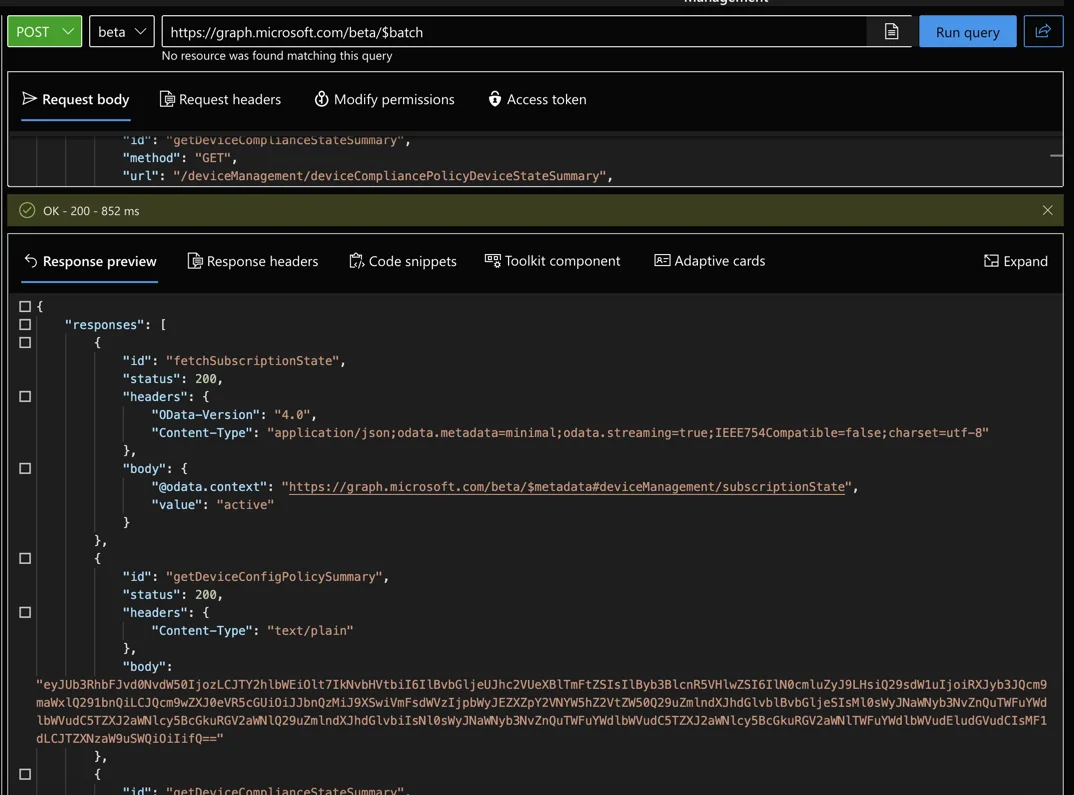
Some of the content is also base64 encoded. You can decode this with:
import base64
dec = base64.b64decode(encoded_string)
Tips and best practices for the Graph Batch Endpoint
A few things are worth keeping in mind when you work with this endpoint in production. First, remember the limit of 20 requests per batch, so for larger workloads you need to chunk your requests into multiple batches. Second, individual requests inside the batch can have dependencies using the dependsOn property, which is great when one call has to finish before another runs. Finally, always check the status code of each sub-response, because the outer request can return a success while a single inner call fails.
Common pitfalls to avoid
One mistake I made early on was assuming a HTTP 200 on the outer batch call meant everything succeeded. In reality, each sub-request carries its own status code, and a single throttled or malformed call can quietly return a 429 or 400 while the rest go through. Always loop over the responses array and inspect every status before you trust the data.
Another thing to watch is the URL format. Inside a batch request the URL must be relative to the Graph version, so use /deviceManagement/... and not the full https://graph.microsoft.com/beta/... path. Mixing those up is the most common reason a single request in the batch fails with a 404.
If you want to dig deeper into Microsoft Graph automation, you can also check out my other posts on jannikreinhard.com, where I cover plenty of Intune and Graph scenarios. Once you start using the Graph Batch Endpoint, you will likely never go back to firing single calls in a loop again.

New posts, straight to your inbox.
Hands-on guides on Intune, AI and Azure.